

I want to make a job assignment for my other staffs in my office and take the constraints job assignment (delete, edit, etc.) between themselves at WOLVOX CRM program. How can I do?
A2796Oluşturulma: 28.06.2010Güncellenme: 03.09.2026
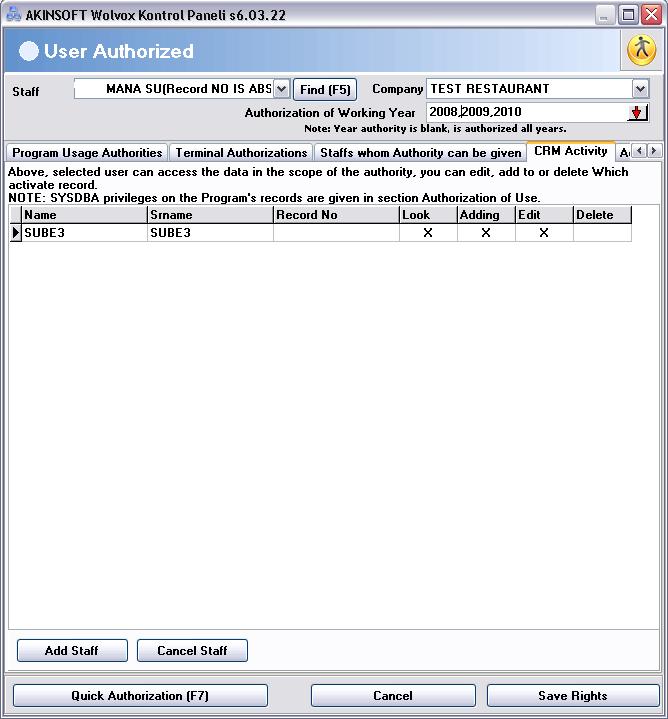
You press "User Operations" tab and then click "User Authorized" from control panel. After selecting the related staff here, come "CRM Activity" tab. Appointment book of the selected staff can be set on which staff's privileges (see, add, delete, edit) here. You can make the process in related staff appointment book according to records what you've made.
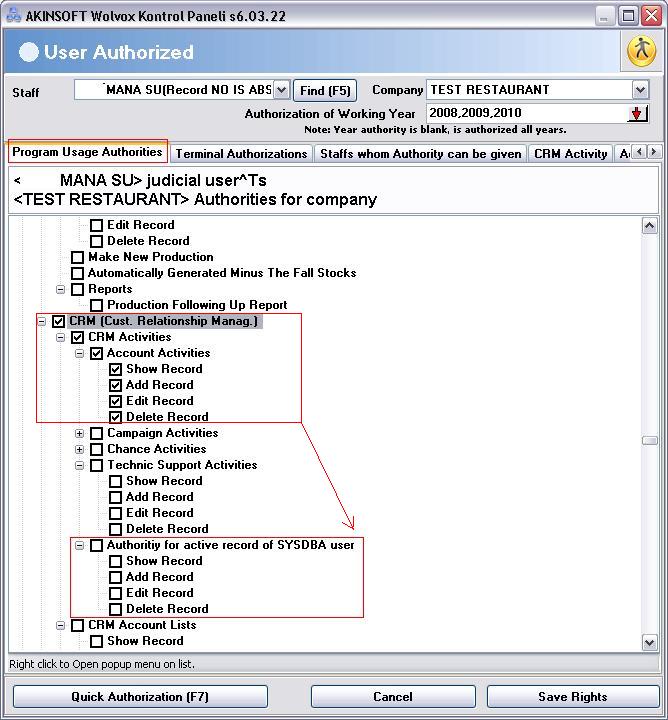
To follow the authorized (SYSDBA) user's activities for other users you can make the relevant authorities from "Program Usage Authorities" tab=>CRM=>CRM Activities section.
Kaynak: AKINSOFT Bilgi Bankası (A2796) — orijinal makale
Bu makale yardımcı oldu mu?
Aynı kategoriden diğer makaleler
Sorun devam mı ediyor?
AKINSOFT Malatya Ana Bayiniz olarak yerinde ve uzaktan destek veriyoruz.