

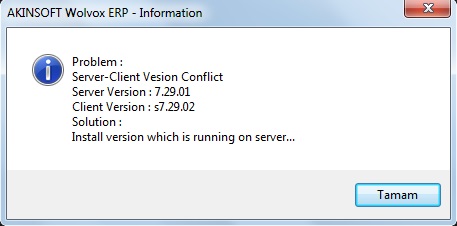
When you get version conflict error in AKINSOFT Wolvox ERP
If you get server-client version conflict error in AKINSOFT Wolvox ERP program in client computer then Wolvox ERP program in client computer has newer version than the one in server computer. For solution after all users are disconnected, Wolvox Control Panel must be shut down. To avoid any kind of data loss you should also back up by copy directory of Wolvox program (Exp:C\AKINSOFT folder). After that from Wolvox Installer you can update Wolvox programs. For more information about update process you can check this link below;
http://www.akinsoft.net/bilgibankasi/index.php?how-can-i-make-version-update-for-wolvox/178/m
Another reason why this error occurs is that Wolvox ERP program is updated but Control Panel is not updated. In this case you should update Control Panel as well.
Kaynak: AKINSOFT Bilgi Bankası (A2809) — orijinal makale
Aynı kategoriden diğer makaleler
Sorun devam mı ediyor?
AKINSOFT Malatya Ana Bayiniz olarak yerinde ve uzaktan destek veriyoruz.