

I am getting an error ''Socket Error #10054 Connection Reset By Peer'' at Control Panel. How do I resolve this error ?
A2818Oluşturulma: 26.05.2017Güncellenme: 03.09.2026
The reason for the 'Socket Error #10054 Connection Reset By Peer' error when logging in from the AKINSOFT Wolvox control panel program; is due to the SQL Server Browser service being stopped or disabled.
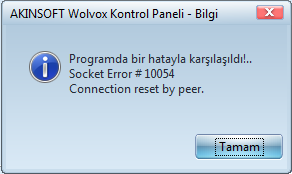
- Start --> Programs
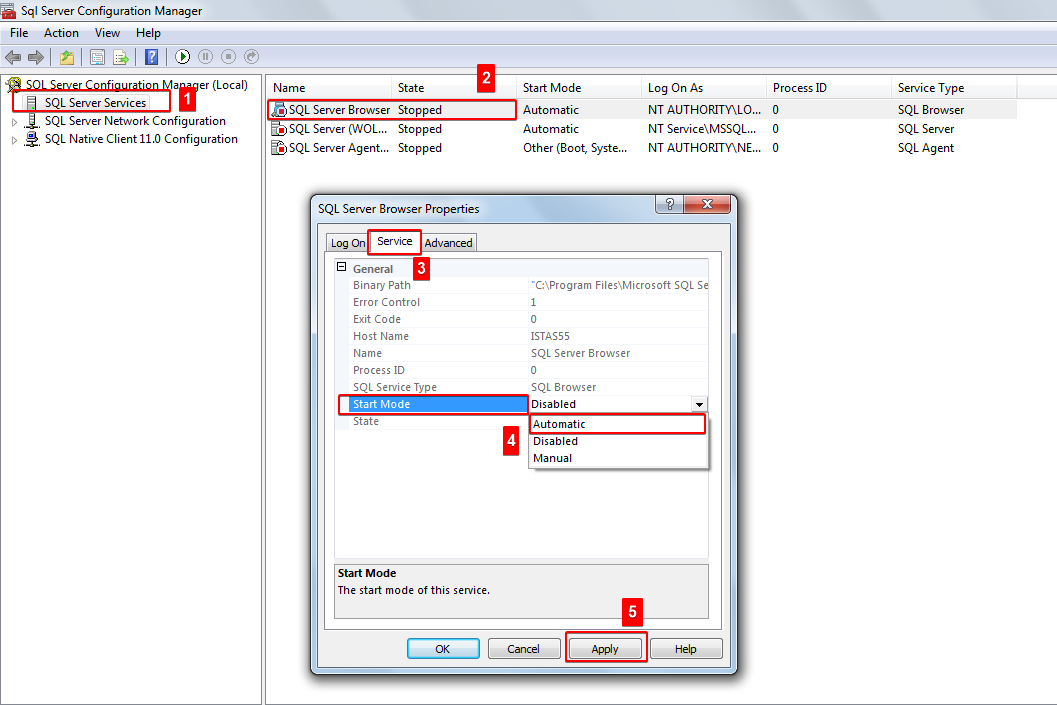
- Microsoft SQL Server R2 - Configuration Tools - SQL Server Configuration Manager
- Click on SQL Server Services.
- Double click on SQL Server Browser.
- Click on the service tab, select 'Automatic' and press the 'Apply' button.
- Then click on the 'Log On' tab and press the 'Start' button.
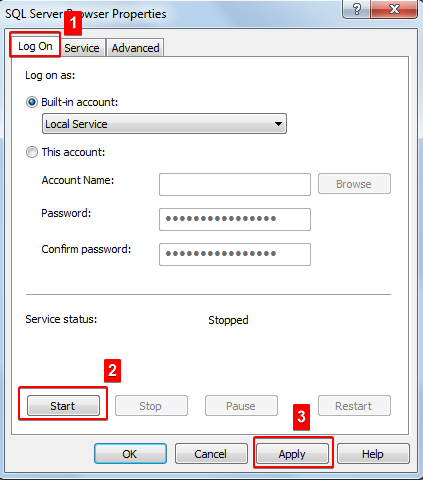
After completing the procedures, you can log in from our AKINSOFT Wolvox Control panel program.
Kaynak: AKINSOFT Bilgi Bankası (A2818) — orijinal makale
Bu makale yardımcı oldu mu?
Aynı kategoriden diğer makaleler
Sorun devam mı ediyor?
AKINSOFT Malatya Ana Bayiniz olarak yerinde ve uzaktan destek veriyoruz.