

Service Group Definitions
- You can create group , middle group and subgroup for your service by using the 'Service Group Definitions' field .
-
To create a group for your service , you can type the group name .If you like, you can type the comment and series number for your group . To complete the record , you can click the 'Save' button.
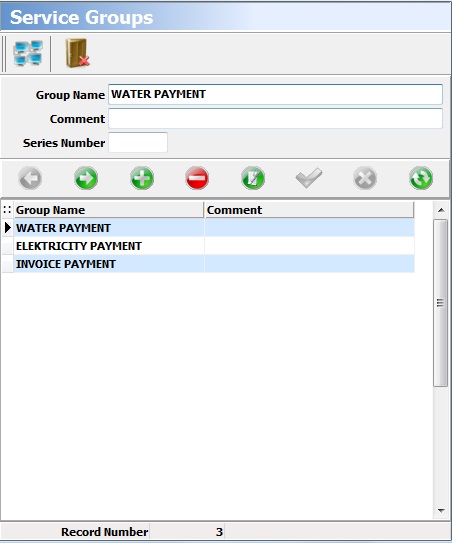
-
To create a middle group for the group , you can click the 'Middle Group Records' button. On the screen that appears , You can type the name of middle group you will create.If you like , you can type the comment and series number for your middle group.To complete the record , you can click the 'Save' button.
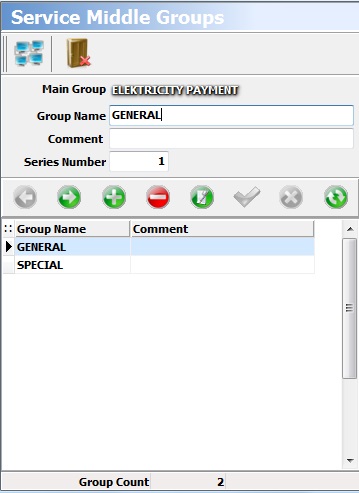
-
To create subgroup for the middle group , you can click the 'Subgroup Records' button.On the screen that appears ,You can type the name of subgroup you will create. If you like , you can type the comment and series number for your subgroup . To complete the record , you can click the 'Save' button.
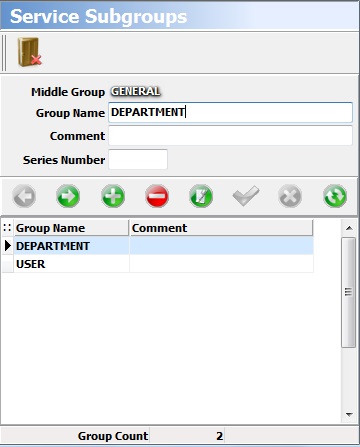
- You can list the services by group , middle group and subgroup by using the features of filtration in the reports.
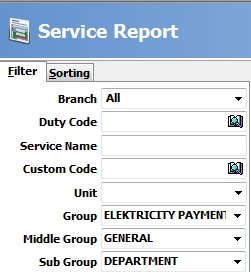
Kaynak: AKINSOFT Bilgi Bankası (A2825) — orijinal makale
Aynı kategoriden diğer makaleler
Sorun devam mı ediyor?
AKINSOFT Malatya Ana Bayiniz olarak yerinde ve uzaktan destek veriyoruz.