

Discount Definitions
Discount Definitions
Discount definitions allow you to define discounts by grouping your clients and stocks in various ways. For example, it allows you to define discounts on stocks in a certain group for a given client group. To use this system, you need to activate “Advanced Discount System” from “Admin > General Settings > “Stock Settings”.
If you use this system, the discount rates defined on the stock cards will be invalid.
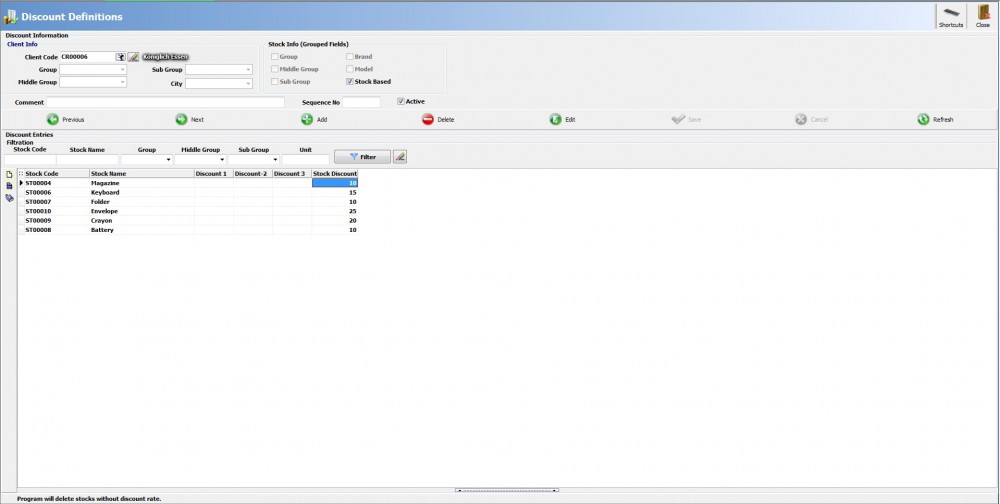
Client Information
It is the field that you can determine the client information to be discounted.
Stock Information
It is the field that you can choose which parts you will use to group your stocks to be discounted.
Discount Entries
Depending on the stock information you have grouped, you can determine the stock discounts from this field.
Quantity Discount
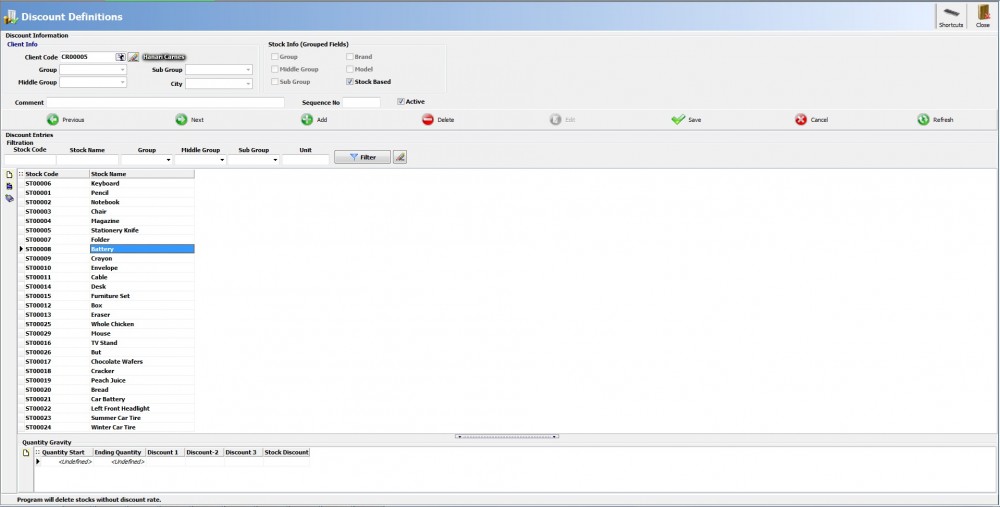
It is the field which you can specify a discount according to quantity information in discount definitions. To activate this field, you need to activate the “Advanced Discount System” and “Use Discount System Based on Quantity Range” option from “Admin > General Settings > Stock Settings". You can define discounts to the stocks you have grouped according to the quantity information from the quantity range section in the subfield.
Kaynak: AKINSOFT Bilgi Bankası (A2827) — orijinal makale
Aynı kategoriden diğer makaleler
Sorun devam mı ediyor?
AKINSOFT Malatya Ana Bayiniz olarak yerinde ve uzaktan destek veriyoruz.