

Package Definitions
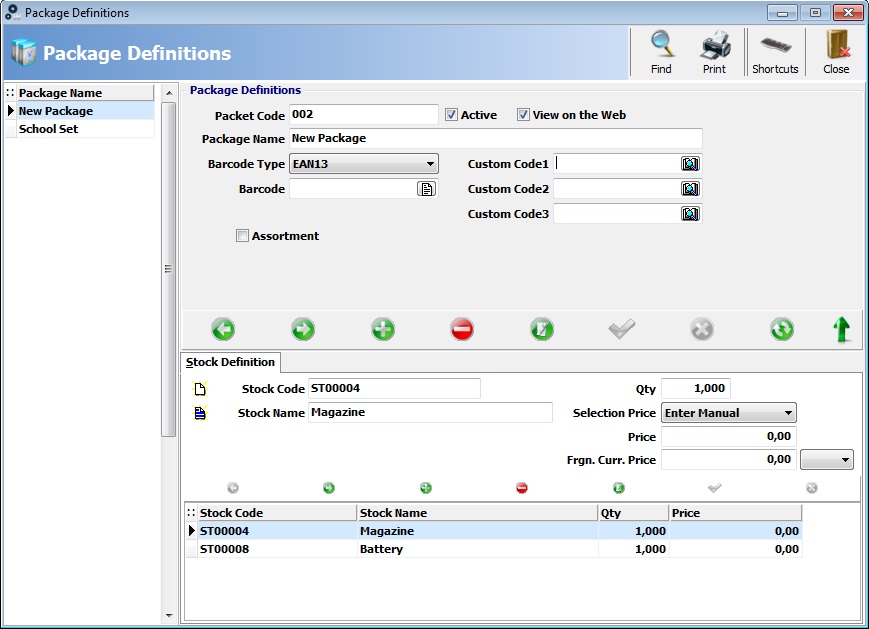
In this field, you can create a package definition for the products you sell as a package. By creating package definitions, you can transfer the products in the package quickly to the specified forms.
|
Package Code |
You will be able to take advantage of these codes when you query by entering code into the package definitions you create. |
|
Package Name |
By specifying the name of the package you create, you can filter based on the name in the package queries. |
|
Barcode Type |
In this field, you can specify the type of the barcode number that will be given automatically by the package barcode. |
|
Barcode |
In this field, you can specify the barcode of the package you create. |
|
Custom Code |
By entering custom code information about the package, you can query the package according to these custom codes. |
|
Assortment |
With this feature, you can make sales and purchases without showing the details of the products in the package contents in invoice, delivery, etc modules. |
|
Stock Definitions |
In this field, you can specify the stocks in the package and how many pieces are in them. Data is transferred from the related stock cards to the price field. If you like, you can manually change this field. |
Kaynak: AKINSOFT Bilgi Bankası (A2834) — orijinal makale
Aynı kategoriden diğer makaleler
Sorun devam mı ediyor?
AKINSOFT Malatya Ana Bayiniz olarak yerinde ve uzaktan destek veriyoruz.