

AKINSOFT E-COMMERCE and Instagram Integration
In order to display the items on your Instagram account in Akinsoft E-commerce webpage ;
First of all, go to https://www.instagram.com/developer/register/ and sign up. You can sign in to your Instagram account. After signing in, click on ''Manage Clients''.
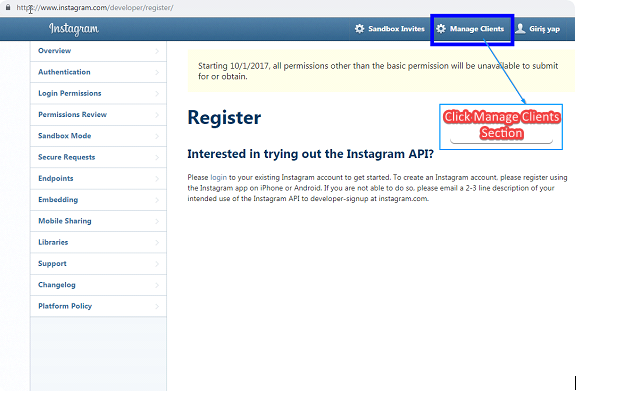
On the new page, you must fill in all the fields.
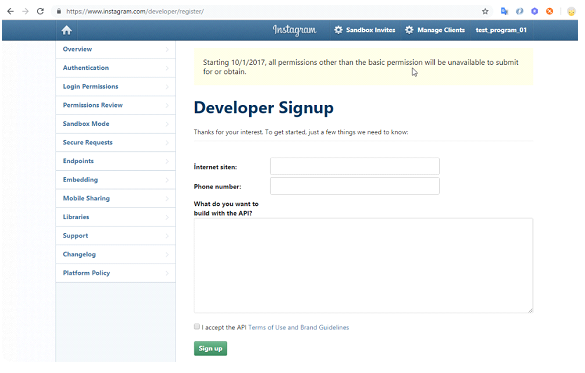
n Manage Client field, click on Register a New Client button and fill in the fields as shown below.
Application Name: - Enter Application name.
Description: Product Listing
Company Name: Type company name
Website URL: Your E-Commerce Url Address
Valid redirect URIs: http://ietapi.akinsofteticaret.net/v1/merchant.aspx?InstaVerification=http:// Your website address.
After that, uncheck the Disable implicit OAuth option in Security tab in the right and save.
You must paste the token value you were given by the system ''Instagram Access Token'' in Settings => Social Network Links in your e-Commerce panel. Once you paste the token value click on the ''connect'' button and see if the connection is successful.
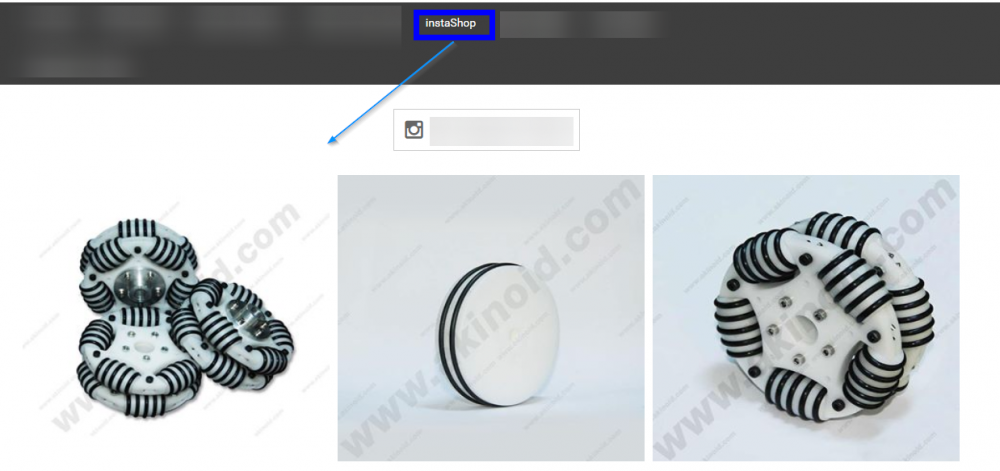
You must create a dynamic page to show the images in your Instagram account on your ecommerce website. To create a dynamic page, go to Other => Content => Dynamic Pages and click ''Add New'' In the new page, type the title you want to display. In case you set your dynamic page URL as http:// site name / instashopping the items in your Instagram will be published on your E-Commerce website.
Kaynak: AKINSOFT Bilgi Bankası (A2977) — orijinal makale
Aynı kategoriden diğer makaleler
Sorun devam mı ediyor?
AKINSOFT Malatya Ana Bayiniz olarak yerinde ve uzaktan destek veriyoruz.