

I have a problem to receive the output with OKI ML 3321 at AKINSOFT Commercial Programs. What should I do?
A2764Oluşturulma: 01.04.2010Güncellenme: 03.09.2026
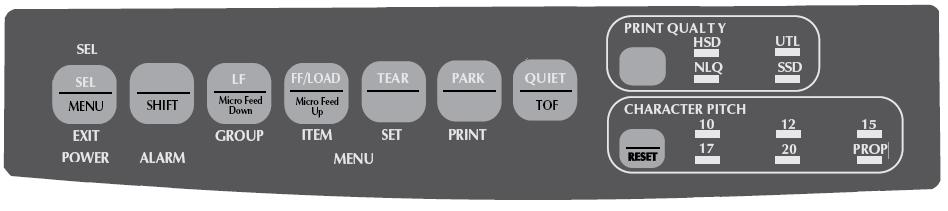
Shift + LF (Micro Feed Down) and Shift + FF / LOAD (Micro Feed Up) keys to reset the paper to the top spot here. Then FF / LOAD (Micro Feed Up) by pressing save your settings. Insert new paper to your printer FF / LOAD (Micro Feed Up) to press the button if you set the paper point stands.
Kaynak: AKINSOFT Bilgi Bankası (A2764) — orijinal makale
Bu makale yardımcı oldu mu?
Aynı kategoriden diğer makaleler
I use Windows XP and EPSON LX 300 printer. I have a problem to print invoice. What should I do?A2765I use Epson Printer. I want to open Tear Off features. What should I do ?A2766Output from the printer at AKINSOFT,"Range Check Error".A2768How to Show Stock Comment info At Invoice designA2965System Error Code5 Access DeniedA3226
Sorun devam mı ediyor?
AKINSOFT Malatya Ana Bayiniz olarak yerinde ve uzaktan destek veriyoruz.