

Automatic Refreshing in Wolvox ERP Reports
A2919Oluşturulma: 12.12.2019Güncellenme: 03.09.2026
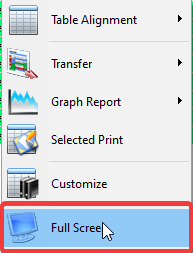
AKINSOFT Wolvox ERP program enables to get reports on full screen and refresh periodically. All you need to do is open any list result and select "Full Screen" from the drop down menu when you "Right Click".
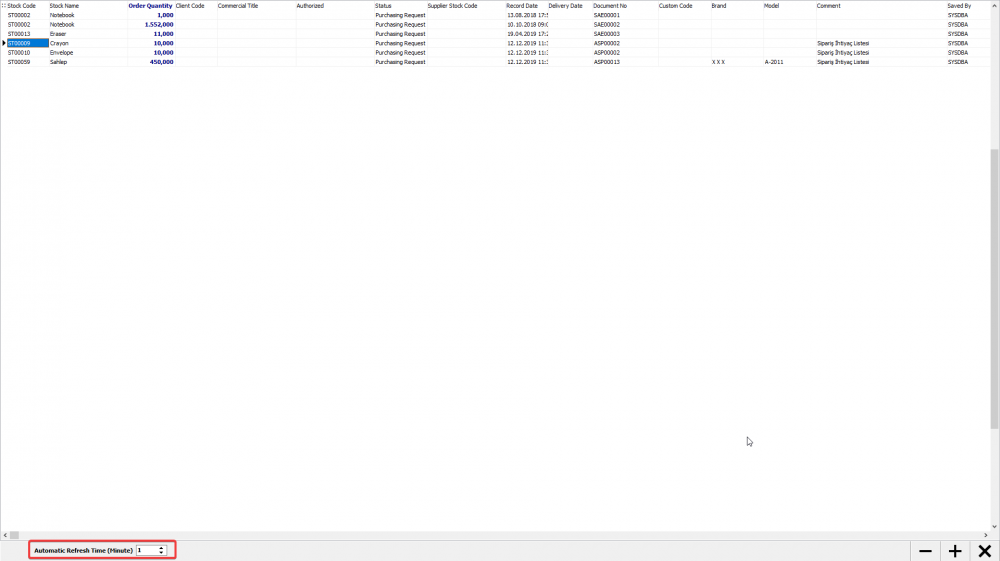
In the "Auto Refresh Time (minute)'' section at the bottom left of the full screen mode, you can enter the time and refresh it for the period you specify. When a new row is added to the list, it will automatically be added to the list because filtering will take place. You can also adjust the font size with the '-' and '+' buttons.
Kaynak: AKINSOFT Bilgi Bankası (A2919) — orijinal makale
Bu makale yardımcı oldu mu?
Aynı kategoriden diğer makaleler
When you get version conflict error in AKINSOFT Wolvox ERPA2809Enabling Retrospective Tracing with Serial / Lot Operations on WOLVOX ERPA2866Wolvox ERP Formula DefinitionsA2867Information About Offline Working System in AKINSOFT ERP programA2870Can I restore the invoices I deleted by mistake in AKINSOFT WOLVOX ProgramA2871
Sorun devam mı ediyor?
AKINSOFT Malatya Ana Bayiniz olarak yerinde ve uzaktan destek veriyoruz.